

Description
VidSecure is offline video-DRM software for Windows. Encrypt your videos with AES-256, lock playback to your customer’s PC or a password you control, add watermarks and expiry, and ship a fully branded player or installer. Stop video piracy — no cloud, no monthly fees.
Why creators choose VidSecure
You spent months building your course. Then one buyer uploads it to a piracy site and your sales evaporate. Ordinary MP4s have zero protection — anyone can copy, re-share, or resell them in seconds.
VidSecure changes that. Your video is transformed into an encrypted file that will only open inside your protected player, only on an authorized computer, and only under the conditions you set. If a file leaks, it’s useless without a key — and every play carries a traceable watermark back to the buyer.
Core features
🔐 Military-grade encryption
- AES-256 encryption applied to every video.
- Decryption happens chunk-by-chunk in memory during playback — the decrypted video is never written to disk as a plaintext file.
- Keys and buffers are wiped from memory the moment playback stops.
🖥️ Hardware-locked licensing (two modes)
- Per-PC play keys — each customer sends you their Hardware ID, you generate a unique key that unlocks the content on that computer only.
- Fixed password mode — issue a single password that works on any computer, for when convenience matters more than device-locking.
- One key or password can unlock an entire course (batch of videos) at once.
- Hardware swipe option keeps a customer’s key working after a Windows reinstall or hardware upgrade.
🎬 Your own branded player
Generate a player that’s 100% yours:
- Custom app name, version, and .exe icon.
- Custom accent color, logo, and About text.
- Animated splash screen with your branding.
- A clean, modern landing screen with a one-click play button.
- Full playback controls: seek, volume, mute, fullscreen, keyboard shortcuts (Space to play/pause, Alt+Enter for fullscreen).
- Your own custom file extension (e.g.
.vdx) so protected files are unmistakably yours.
🛡️ Multi-layered screen & capture protection
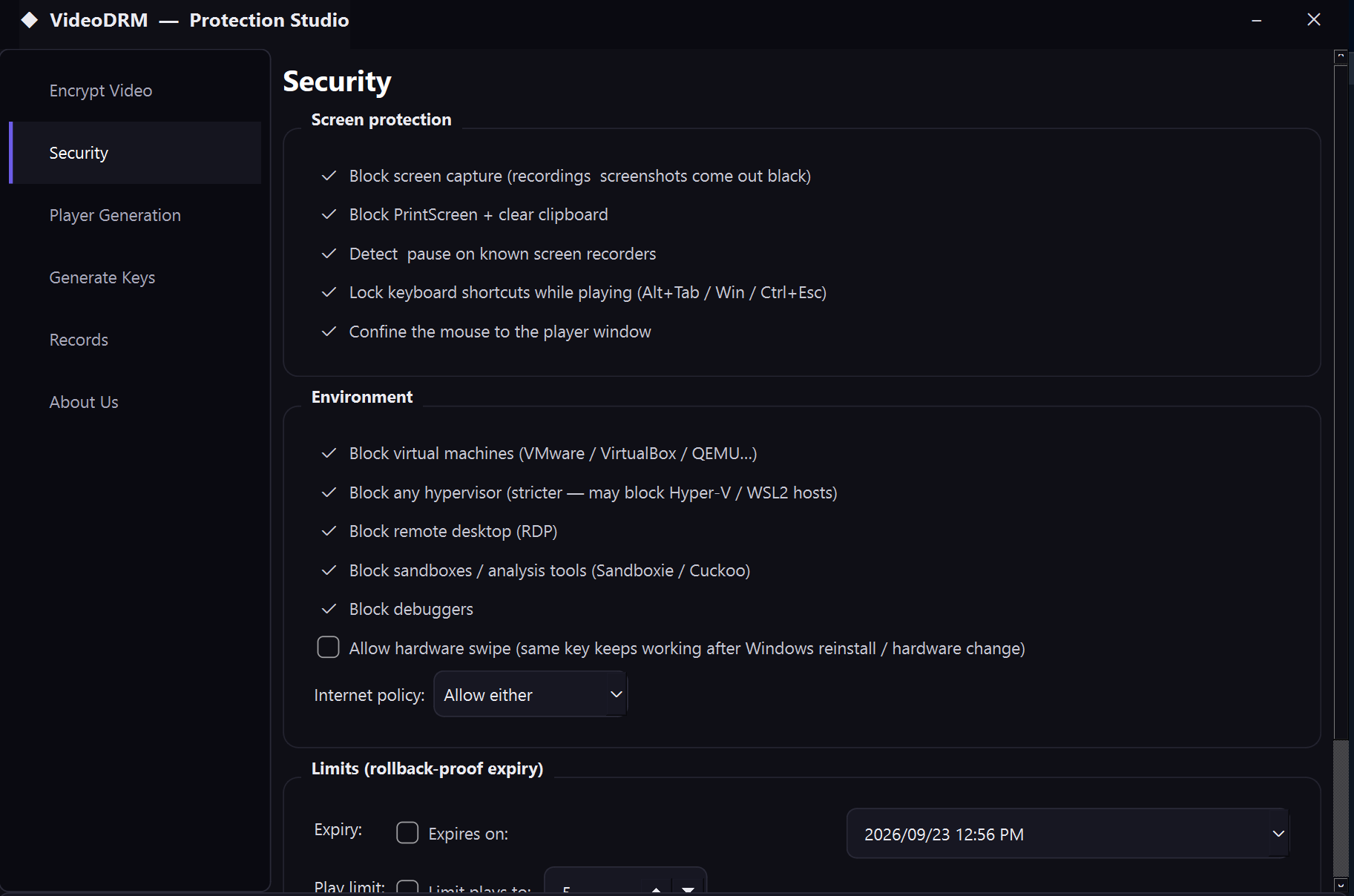
- Block screen capture — recordings and screenshots come out black.
- Block PrintScreen and auto-clear the clipboard.
- Screen-recorder detection — pauses playback if OBS, Bandicam, Camtasia and other known recorders are running.
- Keyboard & mouse lockdown during playback.
🧪 Anti-analysis & environment control
- Block virtual machines, hypervisors, remote desktop (RDP), and sandboxes / analysis boxes.
- Internet policy: require the viewer to be online, offline, or either.
🕵️ Anti-reverse-engineering (player self-defense)
VidSecure players actively defend the decrypted stream:
- Debugger detection (multiple techniques).
- Memory-inspection / RE-tool detection (x64dbg, IDA, Cheat Engine, Process Hacker, and more).
- DLL / library-injection blocking via Windows process-mitigation policies.
- Binary-patch / integrity checking — the player validates its own code at runtime.
- API-hook detection on sensitive system functions.
- Both programs are compiled with symbol stripping and code hardening to resist reverse engineering.
⏳ Rollback-proof expiry & usage limits
- Set an expiry date that can’t be bypassed by turning back the system clock or deleting local data (a monotonic high-water clock is mirrored in the registry).
- Set a maximum play count per computer.
💧 Per-viewer watermarking
- Burn a watermark into playback — text, the viewer’s Hardware ID, or both.
- Choose a fixed corner watermark or one that moves across the screen, so camera-captured leaks are traceable to the buyer.
🔑 Built-in key generator
- Turn a customer’s Hardware ID into a ready-to-send play key in seconds.
- Copy keys to the clipboard with one click.
🗂️ Encrypted, machine-locked records
- Every encrypted video and generated key is logged to a single encrypted database.
- The database is locked to your computer’s hardware — a second PC (or any database viewer) simply can’t read it. It’s never stored as plain text.
- Search, copy, and delete records, and export everything to a clean PDF.
📦 Professional distribution
- Build Player → a ready-to-run folder (player + all runtime files) on your Desktop.
- Build Setup Installer → a full Windows
Setup.exethat installs to Program Files, adds desktop & Start-menu shortcuts, shows your Terms & Conditions, registers your file type, and includes an uninstaller.
How it works — 3 simple steps
- Encrypt — Drop in your videos, enter your secret encryption key, choose your protection settings, and click Encrypt. Your videos become locked files in your custom format.
- Build your player — Set your branding and click Build. Get a standalone player folder or a complete installer to hand to customers.
- Authorize & sell — Your customer installs the player and sends you their Hardware ID (or you give them the password). You generate their key — done. They watch; nobody else can.
Perfect for
- 🎓 Online course creators selling video lessons
- 🏋️ Coaches & trainers distributing paid workout or tutorial libraries
- 🎥 Videographers & studios delivering protected client footage
- 📚 Educators & tutors sharing lecture recordings securely
- 💼 Anyone selling premium video who’s tired of piracy
What’s included
- VidSecure Protector — the all-in-one protection studio (encrypt, secure, generate keys, build players & installers, manage records).
- Player engine — used to generate unlimited branded players for your content.
- Full documentation and a quick-start guide.
- Free updates within your license terms.
System requirements
- Windows 10 or 11 (64-bit) for both the Protector and the generated players.
- No internet connection required to encrypt or to play (unless you choose to require it).
- (Optional) Inno Setup — free — if you want VidSecure to compile installers automatically.
Frequently asked questions
Do my customers need an internet connection?
No. Everything works completely offline. You can optionally require online or offline playback per video.
Can one key unlock a whole course?
Yes. A single key or password can unlock an entire batch of videos on a computer.
What if my customer reinstalls Windows or upgrades their PC?
Enable Hardware Swipe and their key keeps working through OS reinstalls and hardware changes.
Can I brand the player as my own?
Completely — name, icon, colors, logo, splash screen, About text, and your own file extension. Your customers never see the word “VidSecure.”
Do I need any coding knowledge?
No. It’s a point-and-click desktop app.
Is there a subscription?
No cloud, no monthly fees. It runs on your own computer.
Ready to protect your videos?
Stop giving your best work away for free. Lock it down with VidSecure and sell with confidence.
[ Get VidSecure Today → ]
Reviews
There are no reviews yet.