Description
Description:
Lock every file on your USB drive behind one password using strong AES-256 encryption. The protected drive carries its own unlock tool, so you can open your files on any Windows PC — no installation, no account, no internet.
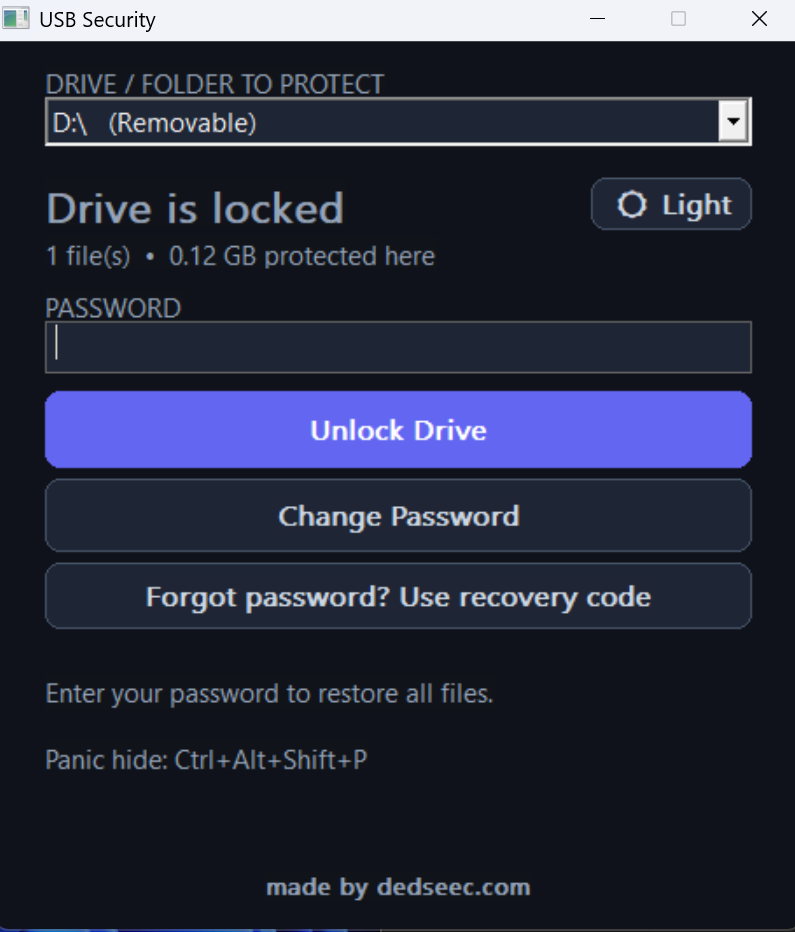
USB Security by DedSec turns any ordinary flash drive into a password-protected vault. Pick your drive, set a password, and click Lock — every file is encrypted with AES-256-GCM and the originals are securely removed. To get your files back, just run the program from the USB and enter your password.
Unlike “file hiding” tools that only flip a hidden flag, USB Vault performs genuine encryption. Without the password, the data is unreadable — there is no master key and no backdoor. Your password is never stored; it only unwraps a one-time random key, so even the program itself can’t open your drive without you.
It’s built for real life: a streaming engine encrypts huge files (videos, disk images) without eating your RAM, an exclude filter lets you skip the file types you don’t care about, and the whole thing ships as a single self-contained .exe with no dependencies, no installer, and no admin rights required. Lock on one computer, unlock on another — the unlock tool copies itself onto the drive automatically.
Clean, modern interface with light and dark themes. Made for Windows 8, 8.1, 10, and 11.
5. Key Features
- Real AES-256 encryption — authenticated AES-256-GCM, not just hidden files. Tampered or corrupted data is detected, not silently restored.
- Your password is never stored — envelope encryption wraps a random master key; there is no backdoor and no recovery without your password.
- One-time recovery code — generated when you first lock the drive, so a forgotten password doesn’t mean lost files (save it offline).
- Unlock on any PC — the unlock tool copies itself onto the USB; open your files anywhere, no install and no account.
- Streaming engine for huge files — encrypts multi-gigabyte files in 4 MB chunks with low memory use.
- Exclude filter — skip files you don’t want locked (e.g.
*.mp3,*.docx,work.txt). - Super-hidden locked files — encrypted files are hidden from normal Explorer view.
- Instant password change — re-key in a click; your files are not re-encrypted.
- Pick any drive — a built-in drive selector targets your USB (the Windows system drive is never touched).
- Anti-brute-force lockout — repeated wrong passwords trigger an escalating delay.
- Corruption-resistant settings — duplicate, checksum-verified config repairs itself.
- Secure-delete of originals — overwrites file data before removal (best effort on flash).
- Panic hotkey —
Ctrl+Alt+Shift+Pinstantly clears the password box and minimizes. - Light & dark mode — modern, clean Windows interface with a live password-strength meter and progress bar.
- Truly portable — one
.exe, no installer, no runtime, no admin rights.
6. How It Works (3 steps)
- Choose your drive and type a password.
- Click Lock — files are encrypted, originals removed, and a recovery code is shown to save.
- Plug in anywhere, run, and Unlock — enter your password and your files return to their original place.
7. What’s Included
usb_security.exe— the application (single self-contained file).- Quick-start README.
- Free updates within the current major version.
- Email support.
8. System Requirements
- Windows 8, 8.1, 10, or 11 (64-bit).
- Any USB flash drive or external drive.
- No installation, no internet connection, no admin rights required.



Reviews
There are no reviews yet.